Best Smart Speaker for Elderly – Top Amazon Picks
Finding the best smart speaker for elderly loved ones can transform how they live independently. As a retired pharmacist with over 20 years of clinical experience, I highly recommend voice-activated technology as a “hands-free” health and safety assistant for seniors.
Best Smart Speaker for Elderly What to Look For
The best smart speaker for elderly adults should have hands-free calling, medication reminders and smart home control. Amazon Echo is widely considered the best smart speaker for elderly because of its simple voice commands and reliable performance every day.
Why Smart Speakers Are Perfect for Elderly Adults
Traditional technology requires physical interaction pressing buttons, navigating menus, reading small text on screens. For many elderly adults, these physical requirements create barriers that make technology frustrating rather than helpful.
Smart speakers eliminate these barriers completely. The senior simply speaks naturally and the speaker responds instantly. No buttons to press, no screens to read, no apps to navigate.
The benefits for elderly adults are significant:
Independence — seniors can control their environment, make calls, and access information without needing help from a caregiver or family member.
Safety — smart speakers can call for help in an emergency, remind seniors to take medication, and alert family members if something is wrong.
Connection — hands-free calling keeps seniors connected with family throughout the day without the physical challenge of operating a phone.
Entertainment — music, audiobooks, radio, and news keep seniors mentally engaged and entertained throughout the day.
Convenience — controlling lights, thermostats, and other smart home devices with voice eliminates the need to get up and move around the home for simple tasks.
What to Look for in a Smart Speaker for Elderly Adults
Voice Recognition Accuracy – the speaker must understand the senior’s voice clearly, even with accent variations or softer speech volumes. Look for speakers with multiple microphones and advanced noise cancellation.
Simple Setup — elderly adults should not need to configure the speaker themselves. Look for speakers that family members can set up quickly and easily, with the senior ready to use immediately.
Loud, Clear Audio — a speaker that is difficult to hear defeats the purpose for seniors with hearing difficulties. Look for speakers with powerful audio output and clear voice response.
Emergency Calling — the ability to call family members or emergency services with a voice command is one of the most valuable safety features for elderly adults living alone.
Medication Reminders — programmable reminders that alert the senior when it is time to take medication are an important health management feature.
Smart Home Integration — compatibility with smart lights, thermostats, and door locks allows seniors to control their entire home environment with simple voice commands.
From a clinical standpoint, a smart speaker is far more than just a convenient device; it is an active, potentially life-saving health intervention. Throughout my more than 20 years of pharmacy practice, medication non-adherence and the risk of falls have consistently been the two most critical challenges faced by seniors living independently.
Preventing Dosing Errors and Cognitive Fatigue: Therapeutic regimens for geriatric patients are often complex. The cognitive fatigue associated with the need to remember strict schedules for multiple medications frequently leads to dangerous dosing errors, such as missed doses or accidental double dosing.
Voice-activated medication reminders serve as a reliable external memory aid, dramatically increasing treatment adherence and reducing the anxiety associated with managing prescriptions.
Hands-Free Crisis Management in the Event of Falls: Certain common medications can cause side effects such as dizziness, orthostatic hypotension (a sudden drop in blood pressure upon standing), or loss of balance, significantly increasing the risk of falls in the bathroom and bedroom.
If a senior falls, they are often unable to physically reach a conventional telephone. A simple hands-free voice command to call emergency services or a family member overcomes physical barriers, drastically reducing the wait time for help.
Combating the Silent Epidemic of Isolation: Clinically, chronic loneliness is just as detrimental to a senior’s health as smoking. Voice assistants offer a unique layer of cognitive stimulation. By facilitating hands-free calls to family, playing familiar music, or reading the day’s news, smart speakers keep older adults socially connected and mentally engaged which is vital for preserving long-term cognitive healt
Amazon Echo Dot (5th Generation) – Best Budget Smart Speaker for Elderly
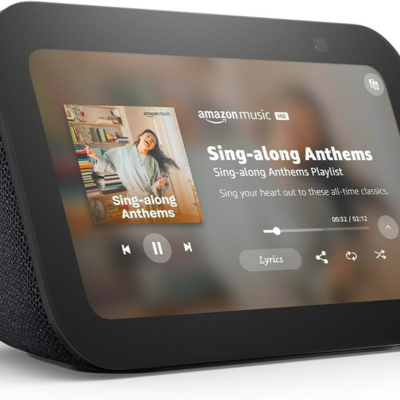
The Amazon Echo is the best smart speaker for elderly adults who want hands-free calling, music and medication reminders. The Echo Show 8 is the best smart speaker for elderly who also want video calls with family. Both are easy to set up and simple to use every day.
For elderly adults living alone, the best smart speaker for elderly provides an important safety layer calling for help with just a voice command. Family members can also drop in instantly to check on their loved one without any action required from the senior.
The Amazon Echo Dot brings all the capabilities of the full-size Echo to a compact, affordable package making it the best budget smart speaker for elderly adults who want Alexa without the higher price tag.
Despite its small size, the Echo Dot delivers clear audio for voice commands and music playback, and supports all the same Alexa features as the larger Echo models including hands-free calling, medication reminders, and smart home control.
Key features:
- Compact and affordable
- Full Alexa capability
- Improved audio over previous generations
- Hands-free calling
- Smart home integration
- Temperature sensor built-in
- Available in multiple colours
Best for: Seniors on a budget who want full Alexa capability in a compact, affordable package.
Most Useful Voice Commands for Elderly Adults
Once set up, these simple voice commands make daily senior life significantly easier:
Communication:
- “Alexa, call [family member name]”
- “Alexa, drop in on [family member’s Echo]”
- “Alexa, send a message to [name]”
Health & Safety:
- “Alexa, remind me to take my medication at 8am”
- “Alexa, call emergency services”
- “Alexa, I need help”
Entertainment:
- “Alexa, play [favourite artist or radio station]”
- “Alexa, read me the news”
- “Alexa, tell me a joke”
Home Control:
- “Alexa, turn on the living room lights”
- “Alexa, set the thermostat to 72 degrees”
- “Alexa, lock the front door”
Information:
- “Alexa, what is the weather today?”
- “Alexa, what time is it?”
- “Alexa, set a timer for 30 minutes”
Setting Up a Smart Speaker for an Elderly Parent
Step 1 — Choose the right location Place the smart speaker in the room where the senior spends most of their time usually the living room or bedroom. Position it within easy speaking distance and away from TVs or radios that might interfere with voice recognition.
Step 2 — Set up the app Download the Alexa app (for Amazon speakers) or Google Home app (for Google speakers) on your smartphone. Connect the speaker to the senior’s WiFi network and configure all settings from the app.
Step 3 — Add family contacts Add all important family contacts to the voice assistant so the senior can call anyone by name. Test each contact to confirm calls connect correctly.
Step 4 — Programme medication reminders Set up daily medication reminders at the correct times. The speaker will announce the reminder aloud impossible to miss.
Step 5 — Teach three essential commands Start with just three commands call a family member, play music, and ask the time. Once the senior is comfortable with these, introduce more commands gradually.
Step 6 — Enable Drop In Enable the Drop In feature with family members’ devices. This allows family to check in on the senior instantly and the senior to reach family immediately without navigating a phone.
Final Thoughts
The best smart speaker for elderly adults is one of the most impactful technology investments a family can make for an elderly loved one. Voice control removes every physical barrier to technology and gives seniors independence, connection, and safety through the simplest possible interface.
The Amazon Echo is our top recommendation for most seniors combining ease of use, capability, and reliability in one affordable device. For seniors who want video calling as well, the Echo Show 8 is the ultimate senior smart speaker experience.
Browse all senior electronics at Senior Home Technology.