
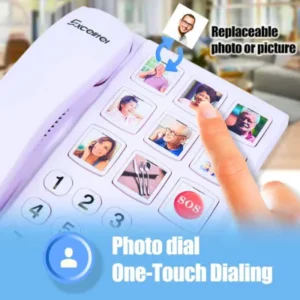
The best home phone for elderly adults is one of the most important communication tools in any senior household. A dedicated home phone for elderly provides large buttons, amplified audio and simple one-touch dialing everything seniors need to stay connected.
Video calling devices for seniors have transformed the way elderly adults stay connected with family and friends. No longer limited to phone calls, seniors can now see their loved ones face-to-face from the comfort of their own home with devices specifically designed to make video calling simple, reliable, and enjoyable.
In this guide, we review the best video calling devices for seniors available on Amazon in 2026 selected for ease of use, screen size, audio quality, and senior-friendly design.
Why Video Calling Matters for Seniors

Loneliness and social isolation are among the most serious health risks facing elderly adults today. Studies consistently show that regular social connection improves mental health, cognitive function, and even physical wellbeing in seniors.
Video calling bridges the distance between seniors and their families allowing grandparents to see grandchildren grow up, participate in family gatherings remotely, and maintain meaningful daily contact with loved ones who live far away.
The right video calling device makes all the difference. A complicated interface, small screen, or poor audio quality can turn video calling from a joy into a frustration and many seniors give up on technology that does not work intuitively for them.
What to Look for in Video Calling Devices for Seniors
Screen Size — a minimum of 8 inches is recommended for comfortable video calling. Larger screens make it easier to see facial expressions and read any text on screen.
Simple Interface — the best video calling devices for seniors have large icons, minimal menus, and one-touch calling. Seniors should be able to start a video call with a single tap on a family member’s photo.
Audio Quality — loud, clear speakers are essential for seniors with hearing difficulties. Look for devices with front-facing speakers and volume amplification.
Camera Quality — a front-facing camera of at least 5MP ensures the senior appears clearly to family members during calls.
WiFi Connectivity — all video calling devices require a stable WiFi connection. Devices with strong WiFi reception perform better in larger homes.
Battery Life — for portable devices, look for at least 8 hours of battery life to avoid constant charging.
Senior-Friendly Tablet for Video Calls
A tablet for seniors is the most versatile video calling device available combining video calling with entertainment, photos, and simple browsing in one easy-to-use device.
The best tablets for senior video calls feature large screens (8-10 inches), simple interfaces with large icons, built-in front and rear cameras, and loud speakers for clear audio. Many senior-friendly tablets come pre-configured with video calling apps already installed so seniors can start calling family immediately without complicated setup.
Key features to look for:
- Screen size of at least 8 inches
- Simple home screen with large app icons
- Built-in front camera of at least 5MP
- Loud front-facing speakers
- Long battery life (8+ hours)
- Lightweight design under 500g
Best for: Seniors who want a versatile device for video calling, photos, and simple entertainment.
👉 View Grandpad Tablet for Seniors on our site
Smart Display for Video Calling
A Smart Display is specifically designed for video calling and is arguably the easiest video calling device for seniors. It sits permanently on a table or countertop, is always on and ready to use, and allows family members to call the senior directly without the senior needing to do anything to answer.
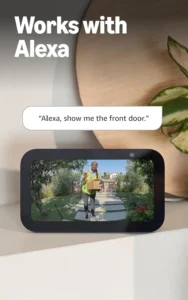
Smart displays like the Amazon Echo Show feature a large touchscreen, built-in camera, and Alexa voice control so seniors can make and receive video calls using only their voice. This is particularly valuable for seniors with limited dexterity or those who find touchscreens difficult.
Key features:
- Always-on display no need to turn on or unlock
- Voice-activated calling “Alexa, call [name]”
- Drop-in calling family can check in instantly
- Large 8-15 inch display options
- No complicated setup required
Best for: Seniors who want the simplest possible video calling experience with voice control.
Large Button Smartphone for Video Calls
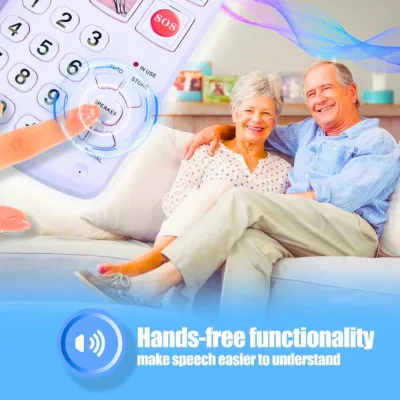
For seniors who prefer a traditional phone form factor, a large button smartphone with video calling capability offers the best of both worlds the familiarity of a phone with the added benefit of video calls.
Modern large button smartphones feature simplified interfaces, large text, and pre-installed video calling apps that work with standard WiFi connections. Family members can video call the senior through standard apps like WhatsApp or FaceTime.
Key features:
- Large physical buttons for easy dialing
- Simplified smartphone interface
- Front camera for video calls
- Loud amplified speaker
- Emergency SOS button
Best for: Seniors who prefer a phone form factor but want video calling capability.
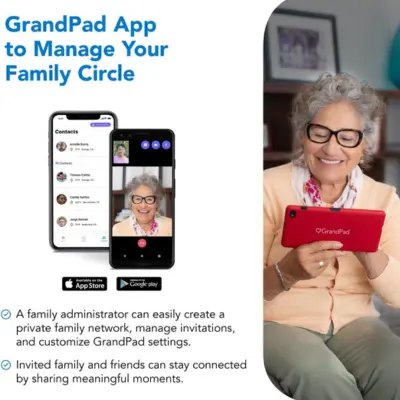
Dedicated Video Calling Tablet GrandPad
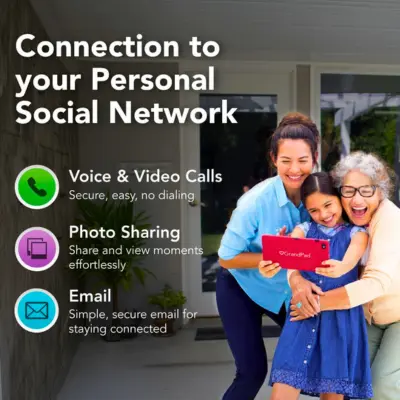
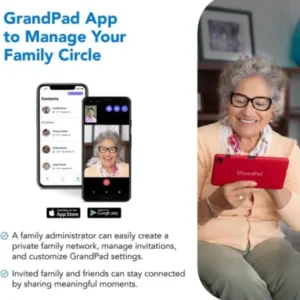
The GrandPad tablet is specifically designed for seniors who want the simplest possible video calling experience. Unlike standard tablets, the GrandPad has a curated app store, a simplified interface with only the most essential functions, and a dedicated support team that helps seniors and families get set up.
Family members can send photos, voice messages, and video calls directly to the GrandPad and the senior receives them instantly with no technical knowledge required.
Key features:
- Purpose-built for seniors
- One-touch video calling
- Family photo sharing
- 24/7 customer support
- No complicated app downloads
Best for: Seniors with very limited technology experience who want the simplest possible video calling setup.
Flip Phone with Video Calling

For seniors who are comfortable with flip phones but want video calling capability, modern senior-friendly flip phones now include front-facing cameras and video calling apps. The familiar clamshell design provides the comfort of a traditional phone while adding modern video calling functionality.
Best for: Seniors who prefer the familiar flip phone design and want basic video calling capability.
Tips for Setting Up Video Calls for Seniors
Set up contacts in advance — add family members as contacts with photos so the senior can call with one tap on a familiar face.
Test before leaving — always test the video call setup with the senior before leaving them to use it independently.
Use the same platform as family — choose a video calling app that all family members already use. Consistency reduces confusion.
Position the device correctly — place the device at eye level on a stable surface so the senior does not have to hold it during calls.
WiFi matters — ensure the senior’s home WiFi reaches the room where they will make most calls. A WiFi extender may be needed in larger homes.
Conclusion
Video-calling devices for seniors represent one of the most valuable technology investments a family can make for a loved one. The ideal device keeps the senior connected, reduces feelings of loneliness, and provides peace of mind for the family all with the simplicity that seniors need and deserve.
Start with a tablet or smart display designed for seniors; both offer excellent video-calling quality in an easy-to-use format that most seniors can quickly master with a little initial guidance from the family.
👉 VIEW – Browse all senior electronics at Senior Home Technology.